Changelog
October 8, 2026 – Lightfern is growing!
v28.2.0Hi there,
We're excited to share that Lightfern is growing!
We've been heads down over the last few months, building a product that extends our vision for a brand new way of working with computers.
Our work should be a point of pride - even more so, in the age of AI.
What's next for Lightfern?
If you'd like to learn more about where we're going, keep an eye on your inbox and our socials (linked below).
We'll be sharing teasers, invites to exclusive events with partners leading in their spaces, and even granting early access to a lucky few!
What does this mean for me?
You'll still be able to use the writing tool that you've come to know and love. We will continue to update you on any changes.
Thank you for being here with us from the very beginning and for sharing our belief in a better way to work. We can't wait to share our next phase with you.
Warm regards,
The Lightfern team
July 14, 2026
v28.1.0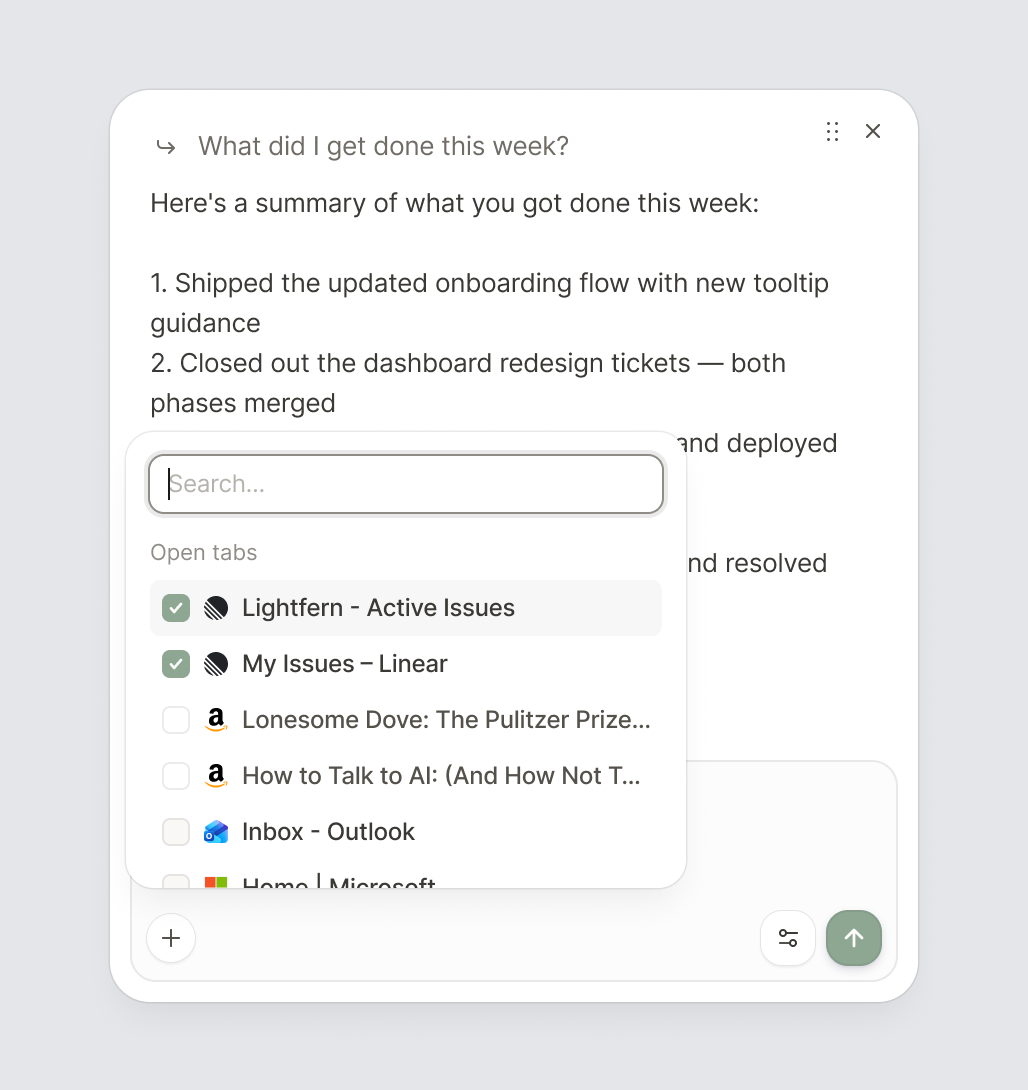
New Features
- Tab context. Choose from open tabs to pull information from across the web without ever leaving your inbox.
New Features
- Release banner. A banner appears after updates to highlight what's new.
July 13, 2026
v28.0.4July 13, 2026
v28.0.3July 9, 2026
v28.0.2July 8, 2026
v28.0.1July 8, 2026
v28.0.0Improvements
- Better tool status labels. Action tools like tab management now show accurate status text instead of generic 'Checking' labels.
Fixes
- Fixed page styling broken when attaching tabs. Attaching a tab in Inline Composer no longer strips styles or breaks interactivity on the page.
July 7, 2026
v26.0707.0940New Features
- Outlook mail search. Search your Outlook mailbox for relevant emails when composing, just like Gmail.
Fixes
- Fixed extension stability. Resolved crashes that could occur when navigating away while the extension was active.
July 2, 2026
v26.0702.0809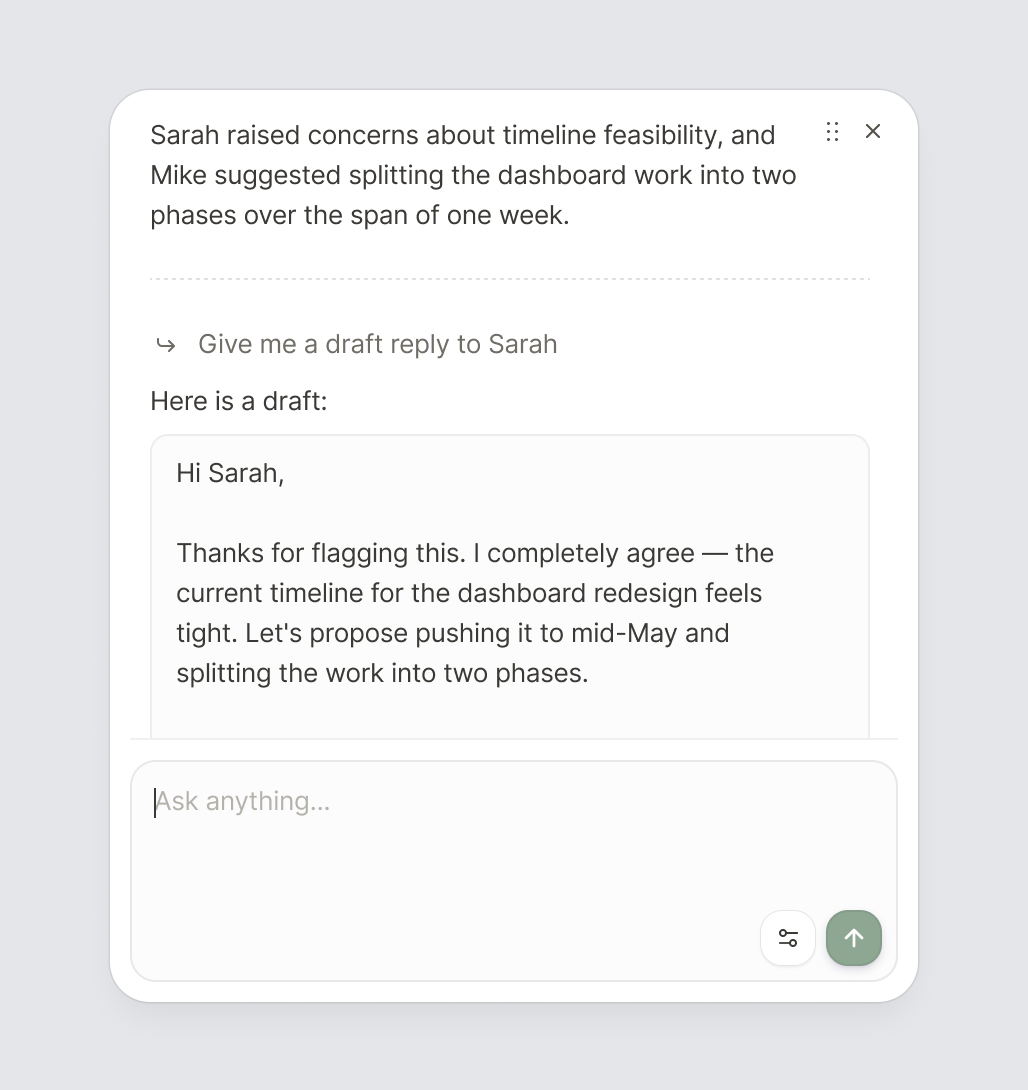
Improvements
- Redesigned Inline Composer layout. Controls now sit in a bottom bar with an inset reply box, giving you more room to read and write.
- Full message preview on hover. Hover over your message in Inline Composer to see the full text in a tooltip.
Fixes
- Fixed Outlook connection detection. Outlook now reliably shows as connected even when the browser's authentication cache is sealed.
- Fixed connect popup preference. Choosing "Don't show again" on the connect popup now persists correctly.
June 24, 2026
v26.0624.1209Improvements
- Faster login for returning users. Already signed in on the web? The extension now skips straight through.
June 23, 2026
v26.0623.1242Improvements
- Streamlined signup for new installs. Installing from the Chrome Web Store now takes you straight to the branded signup page for a smoother onboarding experience.
Fixes
- Fixed inconsistent text colors in Inline Composer responses. Resolved an issue where different text elements in Inline Composer output rendered in mismatched colors.
June 17, 2026
v26.0617.1229New Features
- Superhuman support. Ultracomplete and Inline Composer now works with Superhuman.
Fixes
- Fixed Microsoft thread handling. Resolved an issue where Outlook thread IDs were double-encoded, which could cause thread context to be lost.
- Fixed Inline Composer corner clipping. The gradient in the top-right corner of Inline Composer no longer pokes out of the rounded border.
- Fixed session expiry handling. The extension now properly resets auth state when your session expires, instead of showing stale UI.
June 9, 2026
v26.0609.1208Improvements
- Extension settings shortcut on marketing site. If you already have the extension installed, the navigation menu now shows an 'Extension settings' link instead of 'Download extension'.
June 5, 2026
v26.0605.1055Fixes
- Fixed logout getting stuck. Logging out now completes more reliably
June 3, 2026
v26.0603.1545Improvements
- Refreshed extension copy. Updated welcome screens, settings descriptions, and keyboard-shortcut hints throughout the extension.
Fixes
- Fixed slow logout. Logging out is now near-instant instead of taking several seconds.
- Fixed dropdown menus not closing. User menus now close reliably when clicking outside, regardless of page animations.
May 29, 2026
v26.0529.1304Fixes
- Fixed connection status resetting. The extension popup now reliably shows your connected accounts, even after periods of inactivity.
May 27, 2026
v26.0527.1521Improvements
- Extension update banner. When the extension updates while you're in Gmail or Outlook, a banner prompts you to refresh instead of reloading automatically — so you never lose a draft.
May 22, 2026
v26.0522.0840Improvements
- Faster onboarding for existing users. If you're already signed in on lightfern.com, the extension now detects your session automatically and skips the login step during setup.
May 21, 2026
v26.0521.0929Fixes
- Fixed Outlook account detection. Resolved an issue where the extension couldn't detect your email address on some Outlook devices, preventing suggestions from working.
May 19, 2026
v26.0519.1546New Features
- Inline Composer on first install. New users now see the Inline Composer automatically after installing, so you can start writing with AI help right away.
Fixes
- Fixed logout button styling. Resolved a visual issue where the logout option didn't display correctly.
May 18, 2026
v26.0518.0757Improvements
- Refined typography and styling. Unified font rendering and text sizing across the extension for a more polished, consistent look.
- Improved font loading. Fonts now load more reliably inside email clients, fixing occasional rendering glitches.
May 6, 2026
v26.0506.1400New Features
- Outlook support for everyone. Connecting Outlook is now available to all users, alongside Gmail.
- Welcome walkthrough video. Onboarding now ends with a short video tour of the main features.
Improvements
- Refreshed Inline Composer look. Updated visuals to match the rest of the product.
- Dismissable Composer banner in the popup. Popup highlights the Inline Composer with a banner you can dismiss.
April 29, 2026
v26.0429.1030Improvements
- Refreshed onboarding visuals. Updated welcome screen artwork and tightened spacing across all onboarding steps.
Fixes
- Fixed Inline Composer becoming unresponsive. Resolved an issue where the Inline Composer could get stuck and stop responding. It now recovers automatically and shows a clear error if something goes wrong.
April 28, 2026
v26.0428.0906Fixes
- Fixed Toggle rendering issues. Resolved a problem where toggles could render incorrectly across the application.
- Fixed onboarding buttons being cut off. Connect buttons on the accounts step no longer get clipped on smaller screens.
April 24, 2026
v26.0424.1322Improvements
- Improved suggestion reliability. Suggestions now load more reliably thanks to smarter context retrieval.
April 24, 2026
v26.0424.0643New Features
- Activity stats in popup. The extension popup now shows your writing activity, including words accepted and emails sent.
Improvements
- Redesigned extension popup. The popup has a fresh new look with improved layout, typography, and locally bundled fonts.
- Refreshed onboarding experience. The welcome flow features updated branding, smoother animations, and a new two-column layout with light and dark mode support.
April 21, 2026
v26.0421.1517New Features
- Gmail search in Inline Composer. Inline Composer can now perform searches in Gmail for you and to improve context.
- Close button on Inline Composer. Added a close button so you can dismiss the Inline Composer with a click.
Fixes
- Fixed rare crash on keyboard input. Resolved an edge case where undefined key events could cause the extension to error out.
April 14, 2026
v26.0414.0931Fixes
- Fixed welcome page not opening after install. The welcome page now correctly appears when you first install the extension.
April 10, 2026
v26.0410.0839Fixes
- Fixed logout button location. The logout popup now appears in the correct position.
March 27, 2026
v26.0327.1819Fixes
- Fixed Inline Composer closing randomly. Resolved an issue where the Inline Composer could close on its own, losing your input and conversation.
March 27, 2026
v26.0327.1151Fixes
- Fixed Inline Composer disappearing during use. Resolved an issue where the Inline Composer would close unexpectedly.
- Fixed extension rendering error. Resolved a crash that could prevent the extension from loading correctly.
March 25, 2026
v26.0325.1106Improvements
- Selection highlight in Inline Composer. When you select text and open the Inline Composer, the selection now stays visually highlighted so you can see exactly what you selected.
March 19, 2026
v26.0319.0828Fixes
- Fixed connection popups reappearing after dismissal. Resolved an issue where popups prompting you to connect accounts would keep showing up even after being dismissed.
March 18, 2026
v26.0318.1355Improvements
- Performance improvements. Optimised how the extension communicates with our servers, reducing unnecessary requests and saving bandwidth.
Fixes
- Fixed welcome page. Resolved an issue where the welcome page would not be available for users who weren't signed in.
March 12, 2026
v26.0312.1616Fixes
- Improved reliability. Improved core infrastructure to provide a more reliable user experience.
March 9, 2026
v26.0309.1159New Features
- Working hours settings. Set your availability for each day of the week with flexible time ranges. Lightfern will use this to tailor suggestions to your schedule.
Improvements
- Better drag and resize behavior. The Inline Composer no longer gets cut off at the edge of the screen when dragged or expanded.
Fixes
- Fixed text selection in composer. Resolved issues where selecting text with the mouse or replacing selected text wasn't working correctly.
- Fixed welcome page skipping steps. The onboarding flow no longer unexpectedly jumps ahead when the page refreshes.
February 26, 2026
v26.0226.1544Improvements
- Improved copy button in Inline Composer. The button now provides better feedback when copying text.
- Double-click to reset Inline Composer position. Double-clicking the Inline Composer title bar now resets it back to its default position.
- Plain English keyboard shortcut labels. Keyboard shortcut modifier keys now display human-readable names (e.g., 'Ctrl', 'Alt') instead of symbols.
Fixes
- Fixed Inline Composer not capturing focus. Clicking on blank space inside the Inline Composer now correctly focuses the input.
February 16, 2026
v26.0216.1643Improvements
- Visual improvements to Inline Composer. Refined the appearance of the Inline Composer for a cleaner, more polished look.
Fixes
- Fixed Inline Composer dragging when moving the mouse quickly. The composer no longer loses track of your drag gesture when you move the mouse quickly.
February 13, 2026
v26.0213.1112Fixes
- Fixed Inline Composer input width. The text input field in the Inline Composer now fills the correct width.
February 12, 2026
v26.0212.1056Improvements
- Inline Composer close hint. The Inline Composer now shows a small hint explaining how to close it.
February 10, 2026
v26.0210.1048Improvements
- Inline Composer now expands upwards. The composer now generally expands upward instead of downward for better visibility.
Fixes
- Fixed calendar permission errors. Resolved issues accessing your calendar.
- Fixed em dash spacing. Improved spacing around em dashes in suggestions.
February 4, 2026
v26.0204.1355New Features
- Open signup. Lightfern is now available to everyone without an invite code.
February 2, 2026
v26.0202.1705Fixes
- Fixed welcome flow. Resolved issues with onboarding progression.
January 30, 2026
v26.0130.1719New Features
- Inline Composer. New AI-powered chat interface for getting feedback, summarizing emails, and asking questions about your inbox.
Improvements
- Enhanced Inline Composer UX. Improved styling, animations, and positioning with draggable interface.
- Better keyboard shortcuts. Changed default Inline Composer hotkey to Ctrl+Command+L.
- Improved whitespace handling. Better behavior for em dash replacement.
- Revamped onboarding. New welcome flow for first-time users.
January 23, 2026
v26.0123.1507Improvements
- Better signup error messages. More helpful feedback when signing up with an existing email.
- Faster page loading. Improved performance across the website.
Fixes
- Fixed down arrow key. Down arrow now works correctly in compose window.
- Fixed email syncing. Resolved issues with syncing emails without subjects.
January 16, 2026
v26.0116.1055New Features
- Invite system. Share Lightfern with friends using personal invite codes.
- Marketing consent toggle. Control your communication preferences in settings.
Fixes
- Fixed Ctrl+K deletion on Mac. Resolved keyboard shortcut conflicts.
January 6, 2026
v26.0106.0927Fixes
- Fixed Mac navigation shortcuts. Ctrl+F and Ctrl+N now work correctly.
- Fixed Ctrl+D hotkey on Mac. Resolved keyboard shortcut conflicts.
December 15, 2025
v25.1215.1402New Features
- Rainbow autocomplete. Colorful visual feedback for AI suggestions.
- FAQ and Security pages. New help pages with detailed information about how Lightfern works.
- Dark theme support. The extension now respects your system's dark mode preference.
- Invite-only access. Sign up now requires an invite code.
December 8, 2025
v25.1208.1523Improvements
- Enhanced calendar context. Better integration with your calendar for more relevant suggestions.
November 21, 2025
v25.1121.1402New Features
- Training consent system. Opt-in to help improve Lightfern by sharing anonymized completion data.
Improvements
- Better email context. Improved understanding of your email threads for more relevant suggestions.
November 5, 2025
v25.1105.1620Fixes
- Fixed Gmail thread fetching. Resolved issues with retrieving email threads.
November 4, 2025
v25.1104.1117Improvements
- Smarter calendar context. Suggestions now focus on your working hours for better relevance.
October 30, 2025
v25.1030.1544Improvements
- Faster response times. Quicker suggestions as you type.
Fixes
- Fixed Shift+Arrow selection. Text selection with Shift+Arrow keys now works correctly.
- Improved suggestion interaction. Prevents accidental text selection of AI suggestions.
- Fixed authentication errors. Better handling of session expiration.
October 27, 2025
v25.1027.1517Improvements
- Better suggestion cleanup. Improved handling of outdated suggestions.
October 22, 2025
v25.1022.1233New Features
- Updated keyboard shortcuts. New keyboard shortcut for Inline Chat with settings reset option.
Improvements
- Smarter calendar integration. Better use of your calendar information in suggestions.
- Cleaner suggestions. No longer shows empty or whitespace-only suggestions.
Fixes
- Fixed popup behavior. Extension no longer pops up unnecessarily when navigating Gmail.
- Fixed caret position bugs. Better cursor positioning after accepting suggestions.
October 16, 2025
v25.1016.1415Improvements
- Timezone-aware calendar. Calendar information now respects your timezone for accurate suggestions.
October 14, 2025
v25.1014.2041Improvements
- Better calendar privacy. Enhanced privacy handling of calendar data.
October 14, 2025
v25.1014.1348New Features
- Improved onboarding. New three-step welcome process with clearer steps for new users.
- Pin extension to toolbar. Easier access to Lightfern from your browser toolbar.
Fixes
- Hide suggestion on text selection. Suggestions now hide when you start selecting text.